Showing posts with label your. Show all posts

Thursday, September 29, 2016

Windows Could Not Load Installer For Battery Please Contact Your Hardware Vendor For Assistance


This error commonly caused by windows installation, it skipped or failed to copy batt.dll (file that related your battery driver) into windows32 folder. So there are 2 ways to solve this:

First method is to install the battery driver :
Microsoft ACPI-Compliant Control Method Battery - 5.1.2535.0

Second, you need to download the batt.dll from:
www.dlldump.com/download-dll-files_new.php/dllfiles/B/batt.dll/5.1.2600.2180/download.html

copy ans paste the file in c:windowssystem32 folder.

Easy right!
Read More..

Friday, September 2, 2016

How To Check Your Drivers Version

You can easily identify what driver version you have by looking at the specific driver properties. You can access the driver properties via Device Manager which available on all Windows Operating System.

For this example I will show how to check the graphic driver version:

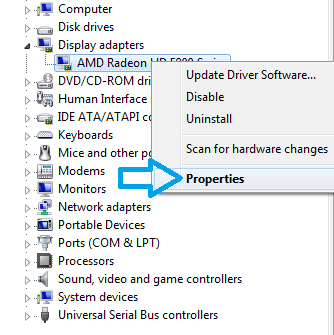
1. First you need to open device manager

2. Next right click on any devices you want, then select properties.


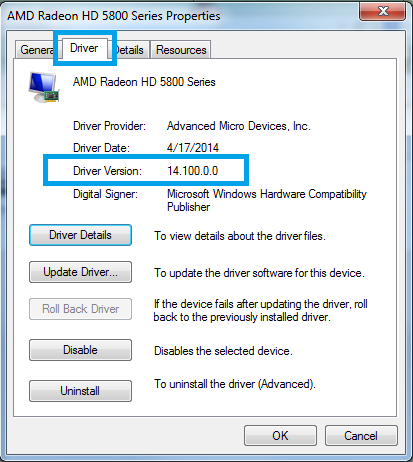
3. After that click on the Driver Tab and you will see the Driver Version will show what driver version currently installed for your graphic.


You can also identify the driver provider and driver dates. Digital Signer will show wither your driver is digitally signed or not.

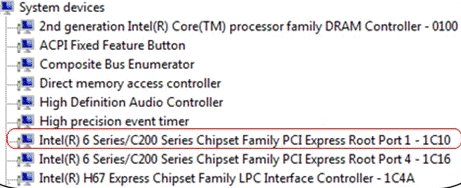
Chipset Driver Version:
Certain devices not directly named as it should be such chipset is nowhere listed on the device manager. The chipset is categorize under system device, here is example Intel chipset 6 series:
Read More..

Tuesday, May 31, 2016

How to Upgrade or Replace Your laptop GPU

It is not difficult to replace your laptop graphic card, the hard part is to upgrade where you need to identify which graphic is better and compatible with your laptop. So how to identify which graphic card is compatible? for this one you need to get advice from laptop graphic card seller and they will tell you what is the compatible graphic cards you can buy for you laptop model. You also can call the service center or Google the Video Cards replacement parts for your model or read the Manuals. For example HP NX9420 and NW series can use Nvidia FX 1500M over AMD Mobility Radeon X1600.

A. Upgrade and Replacement Process
Get your laptop service manual, you will need to read the part removal and replacement. You can get it from your laptop manufacture site. For this tutorial we will replace Acer Aspire 7720 With ATI Graphic Card.

1. Remove the back cover by loosen the screw and open the back compartment.
*Note : For othe model such as HP or DELL or other models, the removal might be slightly different. Please refer your manual.

2. Next step is to remove the heatsink. Unscrew the driver and carefully remove the heatsink.

3. Now loosen the Graphic Chipset Screw, and carefully pull to remove it from the slot.

4. Insert you new graphic and apply fair amount of thermal paste.

5. Lastly put the heat sink back in place and close the back compartment.


C. Things to consider before Upgrade/Replacement.
1.Normally if there is only a slight increase in graphic performance after upgrade. You cant expect to get from 256MB to 512MB. Normally 251Mb to 358MB is the highest replacement I ever know.

2. This method originally intend for replacement where lots of GPU is defect caused by high temperature.

3. Upgrade normally requires you to replace both Mainboard and GPU which costs more than a new laptop, so you better use that money to buy a new one instead of upgrading. Replacement on the other hand only requires a new the same new graphic chipset which is available on

4. If your graphic chipset is defect by overheating, make sure after the replacement the temperature is below 60 degree. Different graphic chip will produce different amount of heat and you need to observe the temperature carefully. Otherwise it will defect again after 30-days (or less).
Read More..

Wednesday, May 25, 2016

Fix Boot Device not Found Please Install OS on your Hard Disk 3f0

You can simply fix this problem by enable Legacy support on the BIOS.

1. Go to BIOS, for HP notebook simply press F10 upon power on.
2. Navigate to System Configuration and Look for legacy Support.
3. You should see the Legacy support is Disable, you need to enable it.
4. After that press F10 to save changes and exit BIOS.
5. It will aromatically reboot after saving changes and your notebook will boot normally.

However, this error may cause from Hard Disk Failure (hardware damage) so this method will not work and you will need to replace the HDD.

How to check your Hard Disk status (damage or healthy)
First make sure you already enable legacy support. If you are unable to boot normally to windows,  try to re-install the operating system (Windows 8 recommended). If you are unable to re-install the OS, run system diagnostic by upon power on press F4 to test your HDD.

In case the HDD failure you need to RMA (return Merchandise authorization) for HDD replacement. Normally the process will take less than 2 weeks. If your warranty already expired, you need to buy a new Hard Disk for replacement. You can ask the store for the replacement process if on;t want to do it yourself with a small fee, most of the time the hard disk replacement service is free.
Read More..

Sunday, May 15, 2016

Skinomi Techskin Protect Your Kindle Fire Skin

DVD Store | Computer Store | Computer | Notebooks | Netbooks | Laptops | IPAD | Gadget | Kindle Fire |


Skinomi TechSkin  

Skinomi TechSkin goes beyond traditional screen protectors, skins, covers, and cases. This protector is made from clear thermoplastic urethane Film - the same Film used to protect military aircrafts and NASA space shuttles. It has the ability to resist high levels of abrasion, making it the ultimate protector for gadgets and devices. The Film "scratch-proofs" your device without adding bulk like traditional cases. Skinomi TechSkin is designed to provide lifetime protection for your device. If the Film ever wears or scratches, Skinomi will replace it under the Lifetime Replacements Program, for as long as you need it for your device. If you ever need to remove the TechSkin, it peels off easily leaving no residues unlike other screen protectors or skins. 

Price: $16.95
Sale: $4.89
You Save: $12.06 (71%)

DETAILS | BUY IT NOW
Read More..